Installing Orihai
The app is free. Make an account, sign in, and it writes on Orihai AI, the managed models, with nothing to configure; free while it is in beta. It also runs on your own model provider key.
Getting it#
The installer is at orihai.com/download. Run it; it installs for your user only and does not ask for an administrator.
Where to get it, and nowhere else#
Orihai is published in one place: orihai.com/download, which serves the file from downloads.orihai.com. Nothing else is us.
If you find an Orihai installer on a download portal, a mirror, a torrent, a file-sharing site, or a repository that is not ours, do not run it. We do not publish there and we cannot vouch for what has been done to the file. An application you give your provider keys to is exactly the thing worth being careful about.
The same goes for anyone who sends you one. Download it yourself, from the address above.
Every build we publish has its SHA-256 printed beside it on the download page, so a file you already have can be checked against what we actually released.
The installer#
One file, orihai-setup-<version>.exe, around 14 MB. Running it installs Orihai for your user only: no administrator, no UAC prompt, and nothing written outside your own profile.
It puts Orihai in your Start Menu, and on the desktop if you tick that box. Installing a newer version over an older one upgrades it in place rather than leaving two copies.
Uninstalling is the ordinary Windows way, from Settings or the Start Menu. It removes the application and then asks, once, whether to delete your stories and settings as well. The default is no. Your backups are kept whichever you answer.
The red screen#
Windows may show a red screen the first time you run the installer:
Windows protected your PC Microsoft Defender SmartScreen prevented an unrecognised app from starting.
Choose More info, then Run anyway. The second button appears only after you click the first, which is the step most people miss.
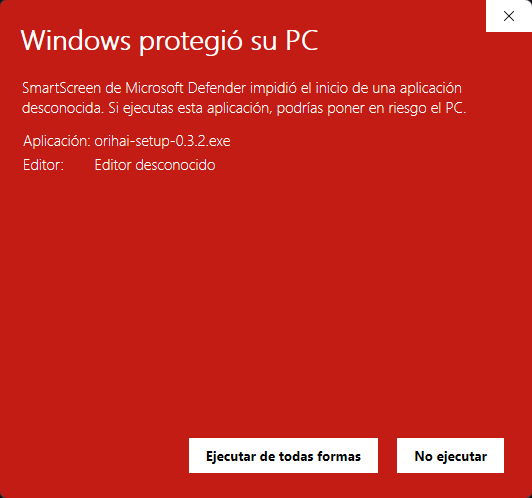
This is SmartScreen, not a failed or corrupted download. It appears for applications it has not seen often enough to recognise, and a new version starts from zero again.
If you would rather check the file before running it, its SHA-256 is on orihai.com/download. Compare it with:
Get-FileHash orihai-setup-<version>.exe -Algorithm SHA256
The app tells you when there is a newer build: Help → About shows the version you are on, and the line under it when a newer one has been published.
What it needs#
Windows 10 or later, 64-bit (x86-64). It is not published for Windows on ARM, macOS or Linux.
The download is a single application, around 14 MB.
It needs no runtime installed alongside it, no service running in the background, and no account, unless you choose managed AI, which is the one arrangement that has one.
Where your data lives#
One folder, under your Windows user profile, holding three things: orihai.sqlite, an images folder for anything an illustration backend generated, and the window position.
Settings has an Open folder button that takes you straight there, which is easier than remembering the path.
Nothing else on your machine is written to, and nothing is written outside that folder.
Backing it up#
A backup is a copy of the file. Settings has Back up now, which makes one for you, and Restore from a backup, which replaces your current data with it.
Restoring replaces. It is not a merge, and the confirmation says so: the button is labelled Replace my data rather than Restore for that reason.
Moving to another machine#
Backup and restore is a copy of one database over another, which is right for one machine and wrong for two. Moving is Export data on the old machine and Import data on the new one.
Import merges into whatever is already there rather than replacing it, so importing onto a machine you have already written on keeps both sets of stories.
Keys do not travel. They are held in the Windows credential store rather than in the database, so an export does not contain them and an import will not carry them. Name the same key again on the new machine and the profiles that reference it work as they did. This is deliberate: it is also what stops a database you hand to somebody else from carrying your provider key inside it.